Sense V2 Flip Clock & Weather
- 4.2
- Rating
- 1.00M
- Installs
- Free
- Price
 Analysis by App-foxy
I spent time with Sense V2 Flip Clock & Weather as a daily weather app rather than treating it as just another forecast screen. Its main appeal becomes clear quickly: it combines weather information with a flip-style clock design that can stay visible on a phone’s home screen. That makes it useful for people who want the time and a quick weather check together, without opening a separate app every time.
It is a free weather app from MACHAPP Software Ltd, available for everyone and supported by optional in-app purchases ranging from $4.99 to $16.99 per item. The app has been around since December 27, 2012, and its current version is 9.14.0. With more than one million installs, an average rating of 4.2 from roughly sixty-nine thousand ratings, and about three thousand three hundred written reviews, it has clearly found a steady audience.
My overall impression is positive, but with an important qualification: this is most convincing when you like glanceable information and widgets. If you only want the simplest possible forecast, a built-in phone weather app may feel quicker. If you enjoy a clock that also acts as a weather dashboard, however, Sense V2 has a more distinctive personality and gives you more control over how that information appears.
You May Also Like

 Blood Strike: 2.5 Anniversary
Blood Strike’s Loadouts Turn Every Drop Into a Tactical Gamble
A close look at Blood Strike’s custom loadouts: how fast access to signature weapons reshapes its battle royale rhythm, rewards preparation, and narrows the gap between fights.

 Pandora - Music & Podcasts
Pandora’s Music Is Easy to Start, but Harder to Recover
Pandora’s strength is its low-effort path from a seed to a station. Its weak spot is how much confidence it asks you to place in connection, setup, and quiet recovery.

 8 Ball Pool
 Is Built on Rivalries, Rematches, and Routine
A close look at the rivalries, rematches, shared routines, and unanswered safety questions that turn a quick pool match into a persistent mobile community.

 Samsung Music
’s Quiet Strength Is Playing What You Already Own
Its reach comes less from spectacle than from dependable access to a personal library. That simplicity is both the app’s strongest retention engine and its ceiling.

 AccuWeather: Weather Radar
AccuWeather Review: A Quick, Clear Forecast for Everyday Decisions
For everyday plans, the best forecast is the one you can understand quickly. AccuWeather makes rain timing, radar, and local conditions easy to act on, with a few trade-offs.

 Hill Climb Racing
Why Hill Climb Racing Still Turns Crashes Into One More Run
A tiny car, a bumpy hill and one more upgrade: Hill Climb Racing keeps resurfacing because its simple chaos makes every near-miss feel personal.
More From Our News Desk



How Sense V2 fits into everyday weather checking
I’ll look at how the clock-and-weather layout fits into a normal checking routine, including when a glance is enough and when I would switch to the fuller app view. From there, the next section can focus on the practical handoff between the home screen and a more deliberate forecast check.
A weather app built around the home screen
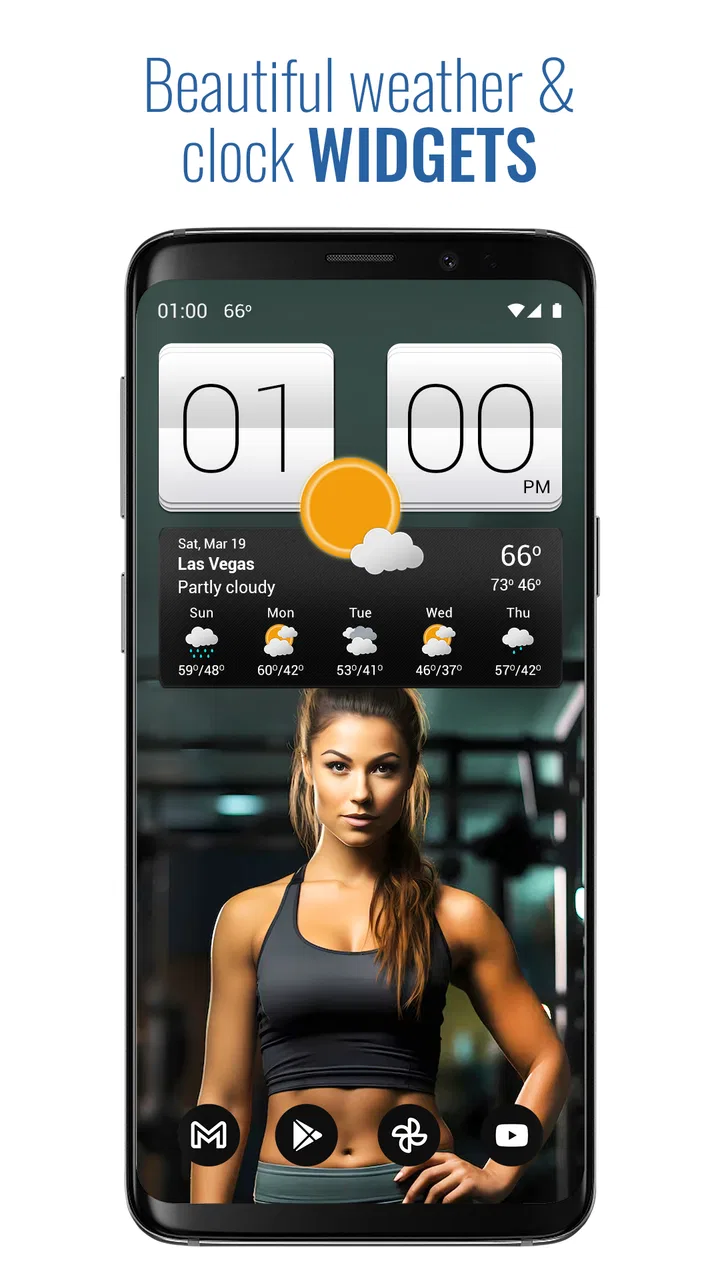
The first thing I noticed is that the experience is not really centered on repeatedly launching the application. The flip-clock style is the identity of the product, and the widgets are where that identity makes the most sense. Instead of opening a forecast, waiting for the layout to load, and then closing it again, I can use the home screen as a small information panel.
That approach works particularly well for routine decisions. Before leaving home, I can check the time, temperature, and general weather situation in one glance. I do not need a detailed meteorological discussion to decide whether to take a jacket or allow extra time for an unpleasant commute. The visual design is more useful here than a crowded page full of charts.
The flip-clock presentation also gives the app a different feel from the standard weather tools that come preinstalled on many phones. Those alternatives often prioritize a clean forecast card or a list of hourly conditions. Sense V2 puts the clock first and makes the weather feel like part of the phone’s everyday surface rather than a separate destination.
When connectivity becomes part of the experience
Weather information is naturally tied to changing conditions, so the app’s usefulness depends on being able to refresh relevant information. I found that this matters most when moving between places or checking the forecast at a moment when conditions are changing. A widget can look perfectly convenient, but its value depends on the information being current enough for the decision I am making.
This creates a subtle trade-off. A home-screen widget is faster than opening a full forecast, yet it can encourage me to trust a small snapshot without checking the wider forecast when the situation is uncertain. For a short walk, that is usually fine. For travel, outdoor work, or a long drive, I would still open the fuller weather view and consider the forecast period rather than relying on the first glance.
I also prefer to treat the widget as a prompt rather than an absolute answer. If the display suggests a change in conditions, I use that as a reason to look more closely. That habit is especially useful when the phone has recently been offline, has just changed location, or has not refreshed the information for a while. The convenience is real, but it should not replace sensible checking.
Why the widgets matter more than the app icon
Many weather apps are judged by their main screen, but Sense V2 is better understood through its widget approach. The store summary describes a full-featured weather app with informative flip-style clock widgets, and that combination is important. The widget is not merely a decorative clock; it is the part that turns the app into a repeated daily tool.
I would spend time choosing a layout that fits the way I use my home screen. A large widget can be useful when I want the weather details visible without tapping, while a smaller arrangement may be better if I keep several essential apps on the first page. The right choice depends on whether I value information density or a cleaner appearance.
There is also a practical design lesson here: a widget should be readable before it is attractive. Flip animations and a clock-inspired style can look excellent, but if the weather details become too small against the rest of the screen, the visual character works against the app’s purpose. I would test the widget in the exact position where I plan to keep it, not judge it only from the setup screen.
Using it during a normal morning
A realistic example is my morning routine. I wake up, glance at the home screen, and see the current time together with the weather instead of opening a dedicated forecast. If the conditions look ordinary, I can get ready without another interaction. If the display suggests something less comfortable, I open the app for a closer look before leaving.
That two-step workflow is one of the strongest ways to use Sense V2: quick glance first, detailed inspection only when needed. It saves effort without pretending that a compact widget can show every relevant detail. I would not expect the home-screen view to replace a full forecast for a whole day, but I find it effective for deciding what to do in the next hour.
What changes when I am away from home
The mobile context is more complicated than the home-screen context. At home, the widget is stable and easy to read. While walking, traveling, or using the phone one-handed, I am more likely to open the app only when I need a specific answer. A decorative clock is less important when I am already checking the phone for directions, messages, or transport information.
For that reason, I see this app as strongest for stationary glances and short planning moments rather than constant outdoor use. It fits a desk, bedside table, kitchen counter, or home screen particularly well. On a busy day, the widget remains useful, but the full weather experience competes with other tools that may already be open.
Location changes are another situation where I would slow down. If I arrive in a new town, I would verify that the app is showing the place I actually care about before making plans. A familiar home-screen glance can create false confidence if I forget that the displayed location may not match my current one. This is not a reason to avoid the app; it is a reason to make location awareness part of the routine.
Handling stale or incomplete moments
Every connected weather experience has moments when the information is not as immediately useful as expected. A widget may show an older-looking state, a refresh may take longer than I want, or the phone may not be in a good position to update information. The important question is how I recover without wasting time.
My approach is simple: I first check the main app instead of repeatedly tapping the widget. If the full screen provides a clearer view, I use that to decide whether the issue is merely the compact display or whether I should wait before trusting the result. I also avoid making a major outdoor decision from a single glance when the displayed conditions do not match what I can see outside.
This recovery habit is more useful than constantly refreshing. Repeatedly forcing an update can make the app feel unreliable even when the real problem is a temporary connection or a location change. Sense V2 works better when I give the widget a supporting role and use the main interface for confirmation.
Where the design can create friction
The same visual style that makes the app recognizable may not suit everyone. Flip-clock elements have a strong character, and users who prefer a very plain, modern weather card may find the presentation busier than necessary. I personally like the clock-led layout, but I would not call it universally neutral.
There is also a learning curve in deciding which information deserves space. Weather apps can become less helpful when every available detail is placed on a widget. The temptation is to configure a display that looks impressive but takes longer to interpret than a simple temperature and condition line. My advice is to start with the smallest useful amount of information and add more only if it solves a real problem.
The free entry point is helpful, especially for someone who wants to try the core experience before spending anything. Optional purchases may make sense for users who want more customization or a more complete setup, but I would first use the free version long enough to decide whether the flip-clock style actually fits my habits. Paying for a design you rarely look at would not improve the experience.
Keeping data use sensible
Because weather information changes, some network activity is part of the basic concept. I would be careful about treating the widget as something that must update constantly. A weather check for a morning commute and another before an evening activity may be enough for many people. There is little benefit in obsessively checking conditions that are unlikely to affect the next decision.
A data-conscious workflow is to keep the widget for quick awareness, then open the full app only when the forecast matters. This reduces unnecessary checking and keeps the phone from becoming a source of constant weather noise. If I am traveling, I would review the forecast before leaving reliable connectivity rather than assuming that every future glance will be equally convenient.
I also recommend paying attention to battery and data behavior in the context of the phone as a whole. A weather widget is one small part of a home screen, but several frequently updating widgets can collectively make the device feel busier. If the phone’s battery life becomes a concern, simplifying the home screen is a sensible first experiment before abandoning Sense V2.
Who will enjoy this app most
I think Sense V2 is a good match for people who want weather information to be visible without opening a full application. It suits users who enjoy clock widgets, like customizing a home screen, and make frequent short-range decisions about clothing, errands, or commuting. It is also a reasonable choice for anyone who finds ordinary weather apps visually dull.
The app is less suitable for someone who wants a minimal interface with no visual styling around the forecast. It may also be the wrong choice if your priority is a highly specialized weather tool for serious outdoor planning. In that situation, a service focused on detailed forecasting, maps, alerts, or professional-style information may be better suited than a clock-centered app.
I would also skip it if I never use widgets. Without that home-screen relationship, much of the app’s personality is lost, and a simpler built-in weather application may do the job with fewer decisions. Sense V2 earns its place when the clock-and-weather combination is something I will actually see and use throughout the day.
What the long-running product suggests
The app’s release history, beginning on December 27, 2012, gives it a sense of continuity that newer weather apps do not necessarily have. Its current version, 9.14.0, shows that the product has continued to evolve rather than remaining a frozen clock skin. I do not treat age alone as proof of quality, but longevity can be reassuring when choosing a widget that I expect to keep on my phone.
Its audience size supports that impression. More than one million installs indicate that the concept has reached well beyond a niche experiment, while the 4.2 average from around sixty-nine thousand ratings suggests a generally favorable response with room for individual preferences and complaints. I read that combination as evidence of a useful, established app rather than an automatic guarantee that every phone and taste will match it.
My practical setup advice
I would begin by installing the free version and placing only one widget on the home screen. Give it a few ordinary days, including a morning routine and at least one trip away from home. That test reveals more than browsing the configuration options because it shows whether the information is visible at the moment you actually need it.
Next, compare the quick glance with the full forecast. If the widget answers most of your everyday questions, keep the layout simple. If it only looks attractive but does not help you decide anything, resize it or remove it. This is a better test than assuming that a larger widget is automatically more useful.
Finally, consider purchases only after identifying a specific limitation you want to solve. The available items cost between $4.99 and $16.99 each, so I would not buy on impulse. The free starting point makes it possible to judge the design, readability, and place in your routine before committing to optional extras.
My connectivity verdict
Sense V2 Flip Clock & Weather works best when I think of it as a connected glance tool, not as a complete replacement for every weather source. Its strength is the bridge between a familiar clock and timely weather information. That bridge is most useful on the home screen, where it can turn a routine time check into a quick decision about the day.
The connection-dependent nature of weather information means I still need good habits: confirm the location when traveling, use the full app when the forecast matters, and avoid treating a compact display as a guarantee. Those small precautions make the experience more dependable without taking away its convenience.
My recommendation is therefore fairly specific. Try it if you want a distinctive flip-clock widget and a weather view that is always close at hand. Stay with a simpler built-in alternative if you want only the fastest basic forecast, and choose a more specialized weather service if detailed planning is your priority. For the right user, the home-screen widget is the reason to keep it installed, and the weather tools make that clock genuinely useful rather than merely decorative.
FAQs for Sense V2 Flip Clock & Weather
01What is Sense V2 Flip Clock & Weather?
Sense V2 Flip Clock & Weather is a customizable clock and weather app designed for Android devices. It combines a large flip-style digital clock with current weather conditions, forecasts, location details, and additional information such as temperature, humidity, wind, and sunrise or sunset times. Its retro-inspired presentation makes it especially suitable for home screens, bedside tables, tablets, or devices used as desk clocks.
02What weather information does Sense V2 Flip Clock & Weather provide?
The app generally displays current conditions along with useful forecast details, including temperature, feels-like temperature, humidity, wind information, visibility, and precipitation data, depending on the selected weather provider and device settings. It can also show hourly and multi-day forecasts. Accuracy may vary by location, available weather data, update frequency, and whether location services are enabled.
03Can I customize the clock, weather display, and appearance?
Yes, customization is one of the main reasons to use Sense V2 Flip Clock & Weather. Depending on the version and device, you can usually adjust themes, colors, clock formats, weather units, forecast details, animations, backgrounds, and layout elements. Users should explore the settings after installation because some visual options may be grouped separately from weather preferences or may differ between free and premium versions.
04Does Sense V2 Flip Clock & Weather require location access or an internet connection?
The app can work with a manually selected location, but automatic weather updates normally require location permission so it can identify your current area. An internet connection is also needed to download fresh weather data and forecasts. If permissions are denied, you may still be able to use the clock and enter a location manually, although weather information could become outdated or unavailable when the device is offline.
05Is Sense V2 Flip Clock & Weather free to download, and are there advertisements or in-app purchases?
Sense V2 Flip Clock & Weather may be available as a free download, but features, advertising, and premium options can vary according to the version distributed through the Android app store. Some functions may require an in-app purchase or subscription, while advertisements may appear in the free edition. Before installing, check the current store listing for pricing, supported devices, permissions, and the latest purchase conditions.
Pros
- Elegant flip-clock design with customizable themes and colors.
- Detailed weather information
- forecasts
- and useful weather alerts.
- Includes multiple widget sizes for different home-screen layouts.
- Supports location-based weather updates for convenient daily checking.
- Smooth animations and a polished interface on modern devices.
Cons
- Some advanced themes and features may require in-app purchases.
- Frequent weather updates can increase battery and data usage.
- Forecast accuracy depends on the selected weather data provider.
- The many customization options may feel overwhelming at first.
- Some widgets may need manual resizing or refreshing after system updates.

Sense V2 Flip Clock & Weather
Gallery